Bates used to be home to an anonymous messaging app called BlindTiger, this app carried no accounts, no fluff, and just simple up and down votes on posts with nothing else. This rounded with a very light moderation filter allowed for a nice little application that was used pretty ubiquitously among the student population.
Unfortunately, this of course had its issues. After people flooded the app with constant fighting over Zionism the college decided to block the website from the college's WiFi. So why not fill the gap that now exists among the student population. While learning some more web utilities.
I'm currently working on self-hosting the website. I will use an older acer notebook as a headless server that exclusively functions to store logins and message histories. The notebook is running a standard Nix OS Server config. This is primarily being done to learn more about web hosting as well as web UI/UX development. But I also think it's important to expand the range of available platforms people have to express their opinions and ideas.
At Bates, I'm most well known for being the guy who takes notes on
his laptop.
Throughout my life I always struggled with terrible handwriting due
to a nerve impingement in my dominant arm. As such, during my
freshman year of college I decided that if I was going to start
taking notes during my courses I would need an alternative method of
working.
So after doing some searching for a solution to my predicament I
found some very interesting blogs and youtube videos, namely
Gilles Castel's Blog
(Rest in Peace ✝) and the journals by
Senior Mars
which introduced me to \(LaTeX\).This proved to be a massive turning
point for me. By using Ultisnips and Vim I could quickly take course
notes in beautiful formats at speeds comparable to hand writing.
However, I chose to wait for full adaptation of this set up as I was
not sure if it would be sustainable in a college setting. So I
instead chose to use Obsidian, a proprietary markdown viewer with
MathJax support. After a full year of exclusively using this method,
I've made the full switch to Vim and \(LaTeX\). I look to create a
guide or two on how I did this, as my ultimate work flow is slightly
different than those mentioned earlier. But those will come later
on.
In a room filled with iPads and notability tablets, I am simply much
more comfortable on my Dell Inspirion. This is largely because of
these software packages,
Vim
Vim is my editor of choice for multiple reasons. However, between
the blazingly fast run time, low system usage, minimal bloat, and
amazing configuration options there's simply no other valid
option.
Live-LaTeX-Preview
This beautiful plugin
is incredibly useful for giving you the ability to very quickly
compile and manage your current LaTeX documents in a live preview.
This proves instrumental while taking in class notes. Solutions
like VimTex are able to do this aswell, however, they're bloated
and have many many options. I prefer my LaTeX previewer to only
help me preview LaTeX, instead of trying to lint my files.
Zathura
Zathura is a well known PDF viewer. It supports vim keybindings,
works very well with kitty (my terminal) and is incredibly fast. I
can also configure it with pywal. This simple PDF viewer is
beautiful, elegant, and fast. There's nothing else to look for.
Ultisnips
Ultisnips is my method of managing snippets across all my
programming languages. But it's especially helpful when writing
LaTeX.
With Ultisnips, a rather complex equation can be written with very
few actual keystrokes. Thus making it possible to focus on note
taking instead of boilerplate. This also proves very helpful while
writing lab reports, because any time writing "non-content" is
wasted time.
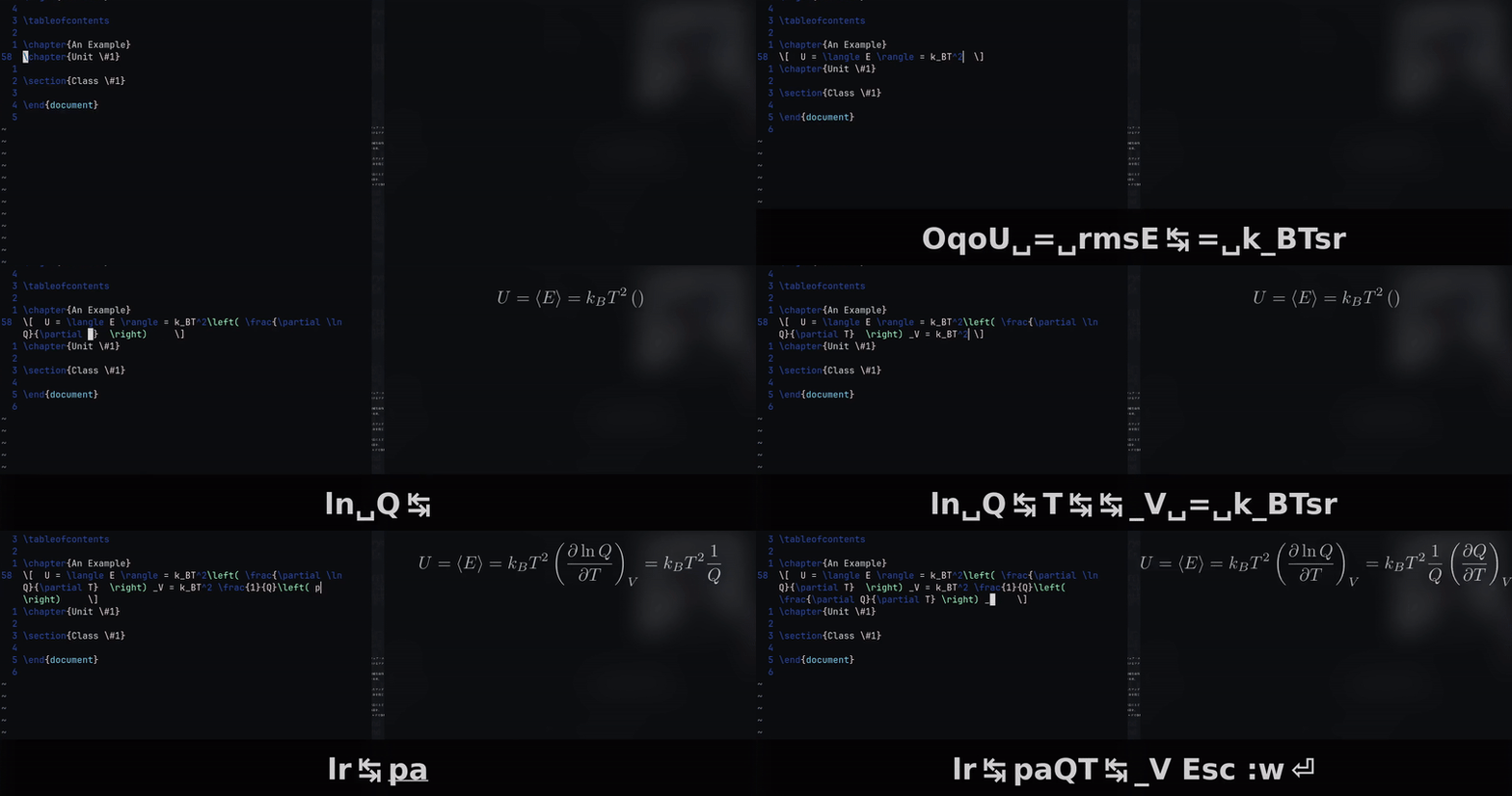
For example, in order to display the general equation for internal
energy one would have to write all of this in LaTeX.
\[ U = \langle E \rangle = k_BT^2 \left( \frac{\partial \ln
Q}{\partial T} \right) _V = k_BT^2 \frac{1}{Q} \left( \frac{\partial
Q}{\partial T} \right) _V \]
\[ U = \langle E \rangle = k_BT^2 \left(\frac{\partial \ln Q}{\partial T}\right)_V = k_BT^2 \frac{1}{Q} \left(\frac{\partial Q}{\partial T}\right)_V \]
This is terrible! What may take someone 15 seconds by hand, would
take me more than a minute due to all of this boilerplate! But
with the snippet library that I wrote,This can be done much
faster.
qoU=rmsE(TAB)= k_BTsrlr(TAB)pa1lnQ(TAB)T(TAB)_V=k_BTsr 1/Q lr(TAB)paQT(TAB)_V
Now while this may not seem too much better, it absolutely is. And
since you're able to see the text being replaced live with vim,
it's much more intuitive. This method also has essentially no
wasted character inputs.
So for a video demo :
I started using linux my senior Summer on a Acer notebook with 2Gb of
ram and a pentium processor that I found at a pawnshop for 35$. After
a few hardware adjustments and a new SSD it could boot but struggled
with using Windows 10. So after doing some research on Mint I booted
to a live usb with Mint and Cinnamon.
After that I've experimented with everything, from essentially fully
built distros like PoP! and Garuda, to more barebones distros like
Arch. After daily driving Gentoo for my first college semester I
decided that the damage to my laptop's battery doing full sys emerges
everynight wasn't worth the cool factor. So I've been using Debian
since January and I've loved its stability. I'll include my main
utlities below.
| Operating System |
Debian 12 Bookworm |
| Terminal |
Kitty |
| Window Manager |
I3 |
| Compositor |
Picom |
| Browser |
LibreWolf |
| Drawing Software |
InkScape |
| Text Editor |
Vim |
| PDF Viewer |
Zathura |
| Video Viewer |
mpv |